
Best Free Text-to-Speech Apps for Android (2026)
VoxLibro Admin
· 5 min read
Picking the best free text to speech app Android offers can feel harder than it should be. The Play Store is full of options, and most "best of" lists just repeat the same marketing copy. This guide compares real apps, based on what they actually do, so you can pick the one that fits how you read, study, or work.
What Makes a Text-to-Speech App Worth Using
Before comparing apps, it helps to know what actually matters. A good TTS app should read your text clearly, work without constant internet access, and stay usable without a paywall blocking core features. However, not every app manages all three. Some apps sound great but need a connection at all times. Others work offline but sound robotic. As a result, the "best" app really depends on what you value most: voice quality, offline access, or a distraction-free interface.
1. Speechify
Speechify is one of the most widely used text-to-speech apps on Android, with a large user base and human-like voices. It can read articles, PDFs, and even text captured from a photo. For example, you can snap a picture of a printed page and have it read aloud almost instantly.
Good for: Readers who want natural, expressive voices and don't mind an internet connection.
Limitation: The free version has restrictions, and the more advanced voices and features sit behind a paid plan.
2. T2S: Text to Voice/Read Aloud
T2S focuses on reading whatever you share with it. You can copy text from any app, tap a floating button, and T2S reads it aloud right away. It also includes a built-in browser mode that extracts readable text from web pages, so you are not stuck listening to menus and ads. In contrast to some competitors, it relies on Google's speech engine, which keeps it lightweight.
Good for: People who frequently share links or copied text and want fast, no-fuss reading.
Limitation: Voice quality depends entirely on the speech engine installed on your phone.
3. Voice Aloud Reader
Voice Aloud Reader reads nearly anything on your screen, including emails, eBooks, and PDF files. One standout feature is the ability to share content directly from other apps, including chat exports, straight into the reader.
Good for: Users who want one app that can handle many file types and formats.
Limitation: Like most free apps in this space, it can include ads unless you upgrade.
4. Android's Built-In Select to Speak and TalkBack
You do not always need a separate app. Android already includes Select to Speak, which reads highlighted text instantly, and TalkBack, a full screen reader for accessibility. Additionally, every Android device has a system text-to-speech engine under Settings, then Languages & Input.
Good for: Quick, occasional use without installing anything new.
Limitation: No reading stats, no saved audio files, and a more basic interface overall.
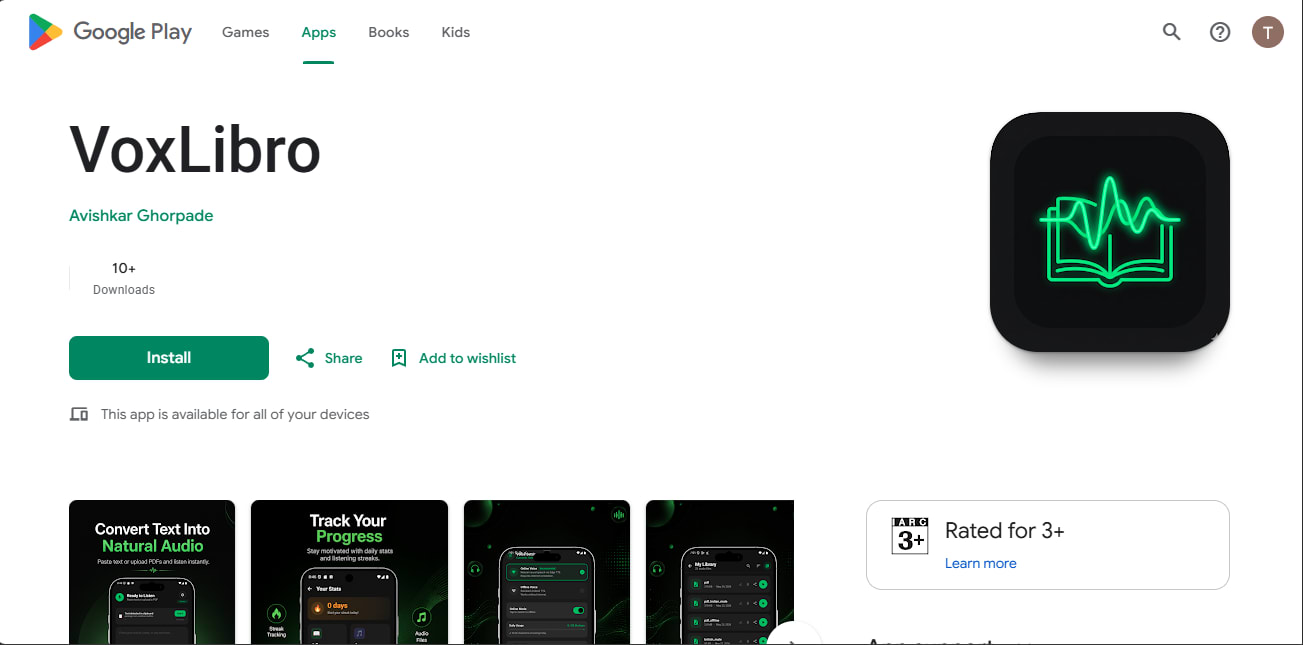
5. VoxLibro
VoxLibro is a lightweight, free Android app built specifically for students, teachers, and professionals who want a clean way to listen instead of read. It supports offline speech conversion, so a lost signal will not interrupt your listening. You can preview voices before committing, adjust speech speed, and use clipboard detection to convert copied text instantly.
VoxLibro also includes:
Reading statistics and a reading streak to track your listening habit
Multiple voice options with preview
Adjustable speech speed
Share speech and delete multiple speeches at once
A modern, minimal interface with no unnecessary clutter
Good for: Anyone who wants offline reliability and simple study or productivity habits without a subscription.
Limitation: As a newer, independently developed app, it does not yet offer some advanced extras like photo-to-speech.
Quick Comparison
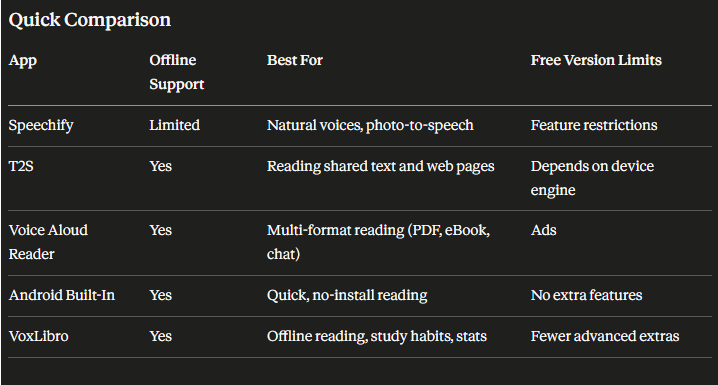
AppOffline SupportBest ForFree Version LimitsSpeechifyLimitedNatural voices, photo-to-speechFeature restrictionsT2SYesReading shared text and web pagesDepends on device engineVoice Aloud ReaderYesMulti-format reading (PDF, eBook, chat)AdsAndroid Built-InYesQuick, no-install readingNo extra featuresVoxLibroYesOffline reading, study habits, statsFewer advanced extras
How to Choose the Right App for You
Your choice really comes down to habits. For example, if you read mostly on the go with unreliable signal, an offline-first app like VoxLibro or T2S makes more sense than one that needs constant internet. If natural-sounding voices matter most to you, Speechify's paid tier is worth trying. However, if you just want something simple for occasional use, Android's built-in tools already cover the basics.
Conclusion
There is no single best free text to speech app Android app for everyone. Speechify leads on voice realism, T2S and Voice Aloud Reader are great all-rounders, Android's built-in tools work in a pinch, and VoxLibro stands out for offline reliability and study-friendly features like reading streaks. Try a couple of these apps directly, since the right fit often comes down to how the voice actually sounds to your ear, not just the feature list.